E2E Docker infrastructure (WebRTC + Playwright)
This page describes the end-to-end stack under repository path docker/e2e/ (browse on GitHub): coturn (STUN/TURN), p2pos-signal (WebSocket signaling), two p2pos-node instances, a static vault-web front end behind nginx, and Playwright driving Chromium. It matches what GitHub Actions runs in the docker-e2e job.
Goals
- Exercise session-bound APIs, album membership, client-side encryption, and replication in one compose project.
- Place the browser on a separate Docker network from the nodes so traffic to the API goes through the UI host (nginx proxy), not direct container DNS to
node-a/node-b. - Keep Web Crypto (Ed25519 via
crypto.subtle) working by giving Chromium a secure context:http://127.0.0.1inside the sharedvault-uinetwork namespace.
Topology (PlantUML)
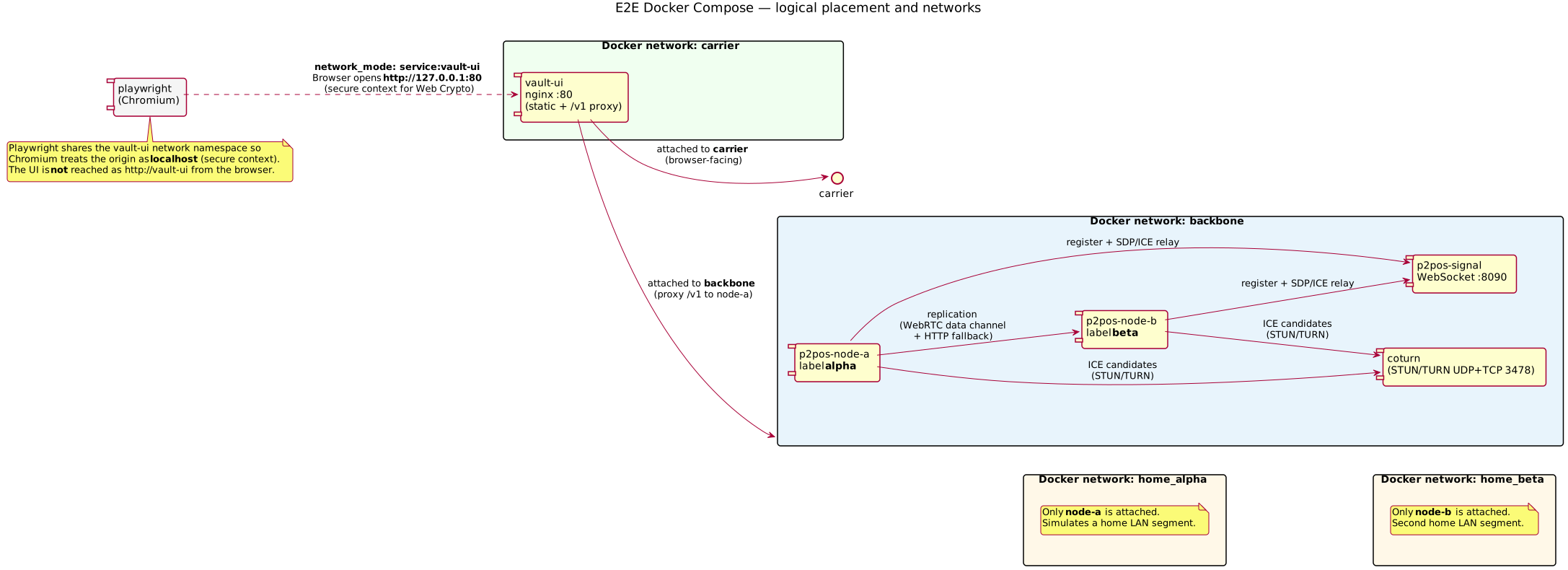
Networks (logical):
| Network | Purpose |
|---|---|
backbone |
coturn, signal, both nodes, and vault-ui (so nginx can proxy_pass to node-a:8080). |
home_alpha |
Extra segment attached only to node-a (isolated “home” LAN). |
home_beta |
Extra segment attached only to node-b. |
carrier |
vault-ui also joins this; represents the path a phone/browser would use toward the public-ish edge. |
Playwright uses Compose network_mode: service:vault-ui: the browser process shares vault-ui’s network stack, so PLAYWRIGHT_BASE_URL=http://127.0.0.1:80 is valid and treated as localhost (secure context). Using a hostname such as http://vault-ui from the browser is not a secure context and Ed25519 key generation fails.
Service roles and ports
| Service | Image / build | Role |
|---|---|---|
coturn |
coturn/coturn |
STUN/TURN on 3478 UDP/TCP; credentials e2e / e2e (turnserver.conf). |
signal |
docker/e2e/Dockerfile.signal |
WebSocket relay for SDP/ICE between peer ids (p2pos-signal). |
node-a |
root Dockerfile.node |
API + vault data; label alpha; P2POS_WEBRTC_PEER_ID=node-a. |
node-b |
root Dockerfile.node |
Replica; label beta; P2POS_WEBRTC_PEER_ID=node-b. |
vault-ui |
Dockerfile.vault-static |
Serves static vault-web; proxies /v1/ and /health to node-a. |
playwright |
Dockerfile.playwright |
One-shot test container; profile e2e. |
On the host, the UI is typically http://localhost:9080 (mapped from vault-ui 80). Signaling is ws://localhost:8090 when ports are published.
Nginx and API path
docker/e2e/nginx-vault.conf serves the SPA and forwards:
/v1/→http://node-a:8080/health→ node-a (for consistency with health checks)
The browser only talks to origin http://127.0.0.1:80 (in CI) or the host-mapped port locally; it never addresses node-b by URL.
Vault API transport in the default E2E image: VITE_VAULT_WEBRTC=0 — the UI uses nginx → node-a HTTP for vault calls so Playwright stays stable. node-b → node-a replication uses WebRTC replicate offers on the same signaling server; the node currently multiplexes one answerer PC for both replicate and vault, so enabling browser vault in this stack can race with replication. Optional: rebuild with VITE_VAULT_WEBRTC=1 and VITE_SIGNALING_WS_URL=ws://signal:8090 for manual experiments.
Environment variables (nodes)
Both nodes share the same replication PSK and signaling URL, with distinct peer ids and data dirs (see docker/e2e/docker-compose.yml):
P2POS_SIGNALING_WS_URL: e.g.ws://signal:8090P2POS_WEBRTC_PEER_ID:node-a/node-bP2POS_WEBRTC_ICE_JSON: JSON array of STUN URL strings and TURN credential objects (parsed byp2pos-net)P2POS_BOOTSTRAP_PEERS_FILE: JSON file mounted read-only so each node knows the other’s HTTP base URL, WebRTC peer id, and ICE JSON without going through the UI
Example bootstrap row (on node-a, peer beta): docker/e2e/bootstrap-peers-node-a.json.
Replication path (PlantUML sequence)
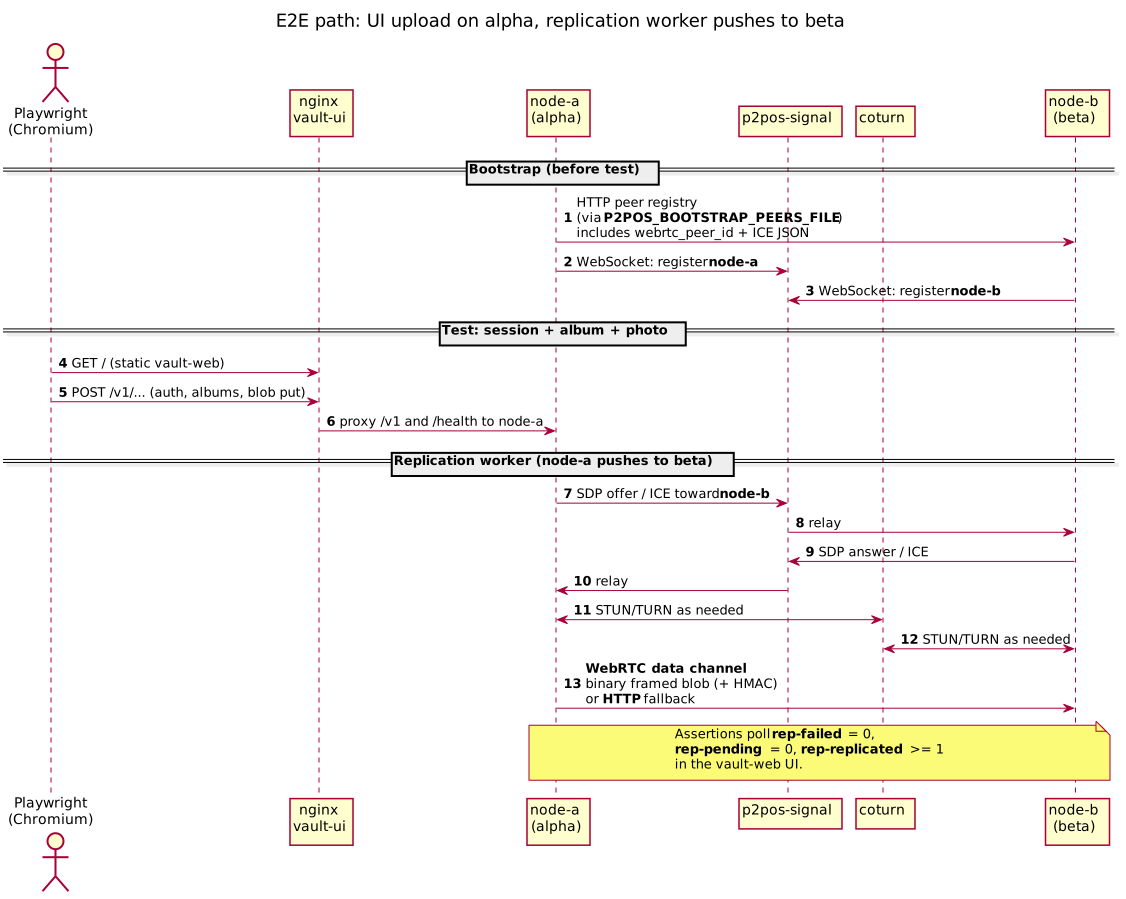
Worker behavior (summary): node-a’s replication transport prefers WebRTC (signaling + ICE + optional TURN) with a binary framed blob payload and HMAC; it can fall back to HTTP for large blobs or if the WebRTC path fails. The E2E test accepts either path as long as counters show success.
Playwright test flow and assertions
Spec: docker/e2e/playwright/tests/ui-behind-nat.spec.ts.
- Open
/and wait for the app shell (data-testid="app-heading"). - Click Generate Ed25519 → wait for “Ed25519 OK” (async keygen).
- Click Generate AES → wait for “AES OK”.
- Authenticate → wait for signed-in badge (up to 60s).
- Assert local node summary shows alpha and peer list shows beta (
data-testid="peer-row-beta"). - Create an album (unique title), open it, upload
fixtures/tiny.png(1×1 PNG). - Wait for “Photo uploaded”.
- Poll until
rep-failed-count= 0,rep-pending-count= 0,rep-replicated-count≥ 1 (intervals up to 2s, overall timeouts up to 120s where needed). - Assert replicated list shows at least one row with ok.
Fixture: docker/e2e/playwright/fixtures/tiny.png.

CI integration
.github/workflows/ci.yml job docker-e2e:
docker compose --profile e2e up --build --abort-on-container-exit playwright
Run from docker/e2e/, same as local. The job builds images, starts coturn, signal, node-a / node-b (with health checks), vault-ui, then playwright. Exit code comes from the Playwright container.
Docs deploy: .github/workflows/cloudflare-pages.yml runs plantuml -tsvg docs/diagrams/e2e/*.puml before mkdocs build so diagrams stay aligned with the .puml sources.
Regenerating diagrams locally
Sources live in docs/diagrams/e2e/*.puml. With PlantUML and Graphviz installed:
plantuml -tsvg docs/diagrams/e2e/*.puml
Committed .svg files are what MkDocs embeds by default.
Limitations
- Docker networks approximate NAT and carrier isolation; they are not literal home routers or CGNAT.
- The test drives node-a through the UI only; node-b is validated indirectly via replication status and worker logs if you inspect them manually.
See also
- Shorter operator notes:
docker/e2e/README.md - Architecture: P2POS Sovereign Family Vault